Know what was promised.
Keep leads, detailed estimates, proposal versions, contracts, and customer decisions in context.
FOR REMODELING & CONTRACTING BUSINESSES
The estimate says one thing, the contract another, the invoice a third. Buildestra is software for remodeling and general contractors that keeps leads, estimates, contracts, change orders, scheduling, purchasing, field work, invoicing and the customer portal in one connected place, so what was approved is what gets scheduled, ordered and billed.
Fully functional · Six months in production · Continuing to refine the experience
 Explore this view
 WHERE REMODELING JOBS COME APART
Most contractor software covers one part of the job and leaves the rest to another app. Buildestra is built to cover the whole loop. Here is the loop, and what usually goes wrong at each step.
Descriptions follow the approved Buildestra feature list. See all 27 areas → Follow one job through every step →
KEEP THE WHOLE JOB IN VIEW
What the customer approved affects what gets scheduled, ordered, installed, and billed. Buildestra helps your team keep those decisions connected.
Keep leads, detailed estimates, proposal versions, contracts, and customer decisions in context.
Coordinate schedules, subcontractors, work orders, materials, photos, and completion reviews.
Follow invoices, payments, costs, margins, closeout, and the obligations that continue into warranty.
BUILT FOR PROJECT-BASED WORK
Residential remodelers · Kitchen & bathroom contractors · General contractors · Design-build companies · Cabinetry & installation · Flooring & tile · Specialty trades
A fit for teams that sell a defined scope and coordinate people, materials, customer choices, and payments.SEE HOW THE DETAILS CONNECT
Give the office a clearer picture of the work, then coordinate the people who make it happen.
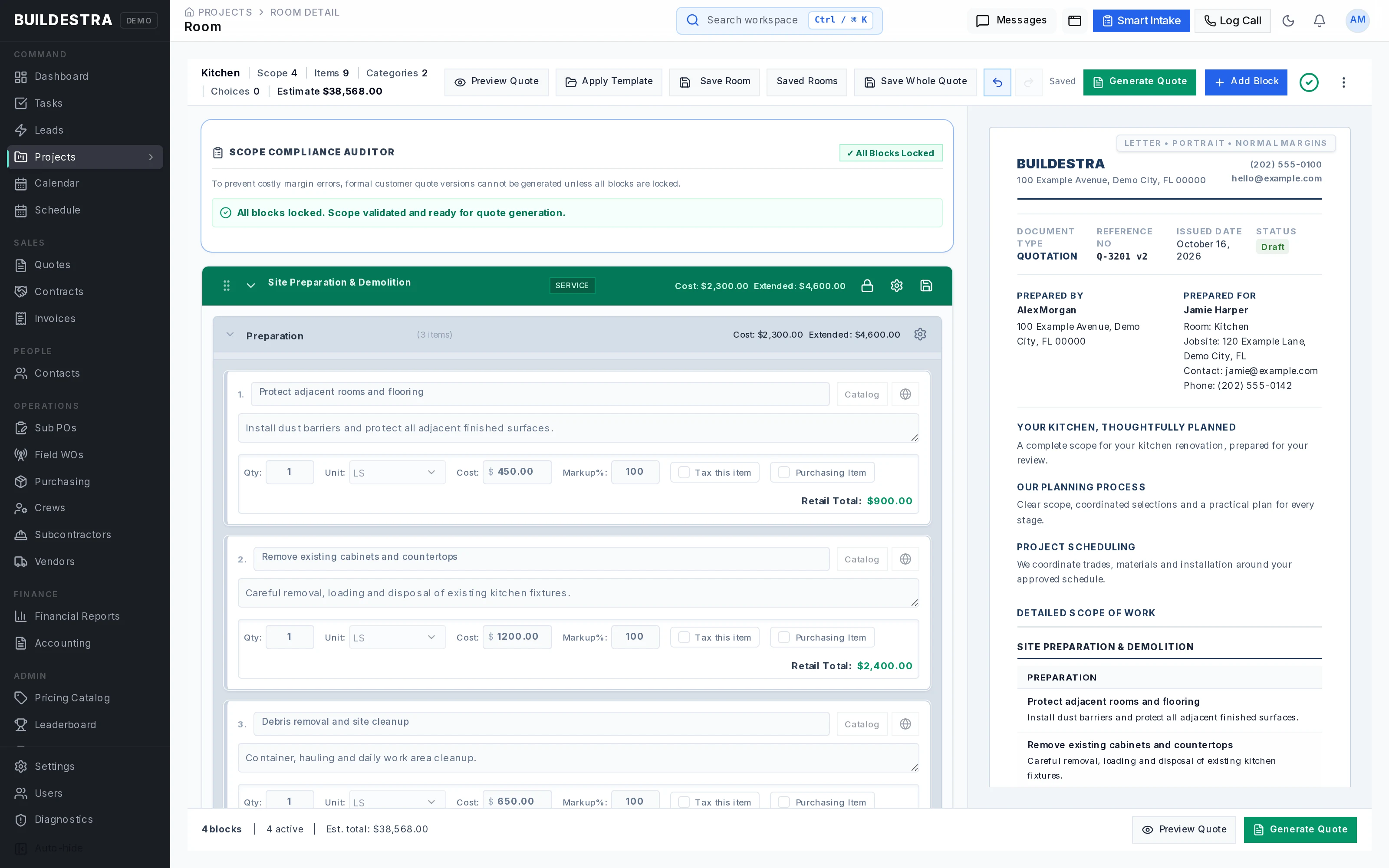
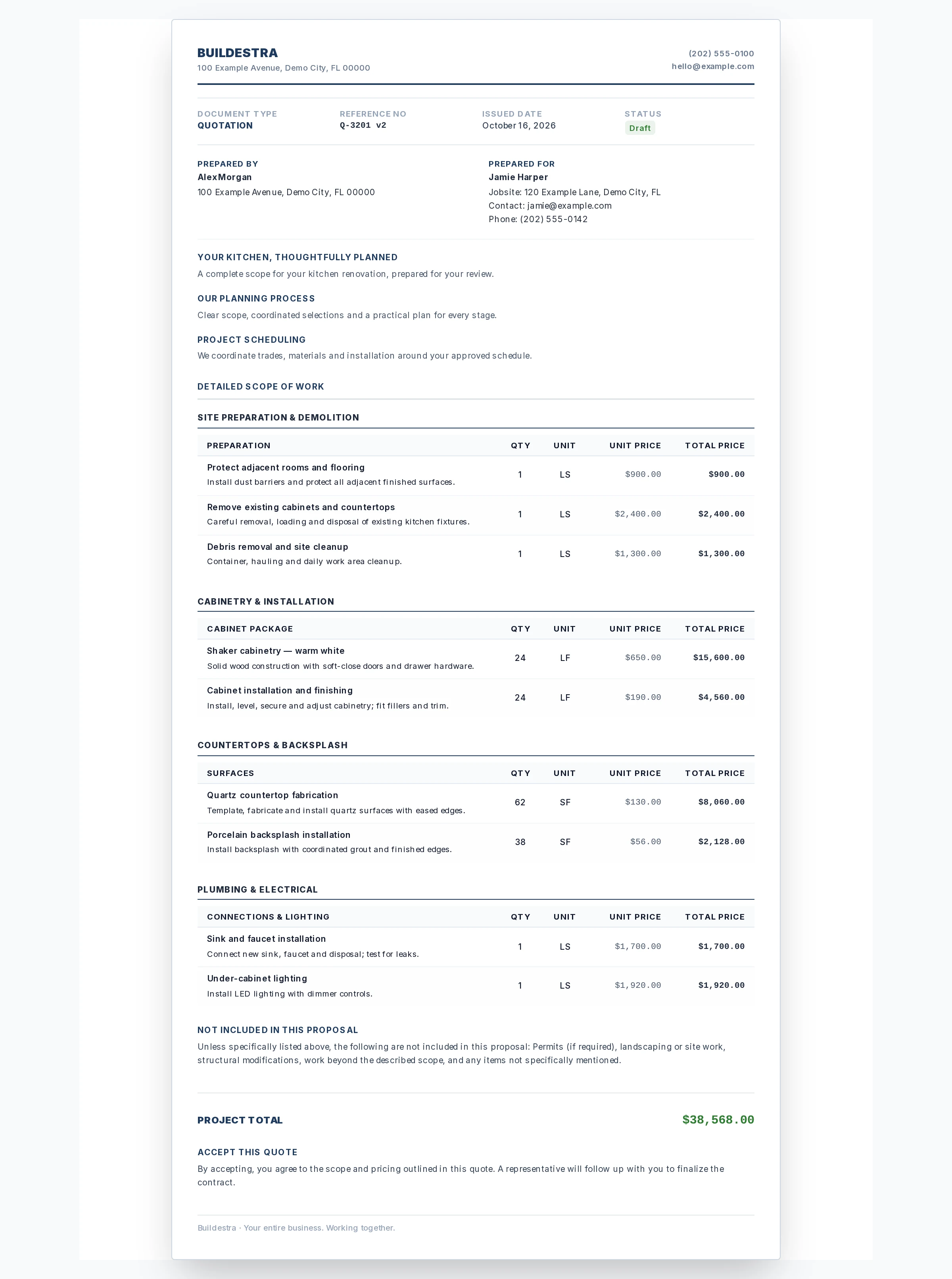
Detailed scope and pricing alongside a customer proposal preview.
 Explore this view
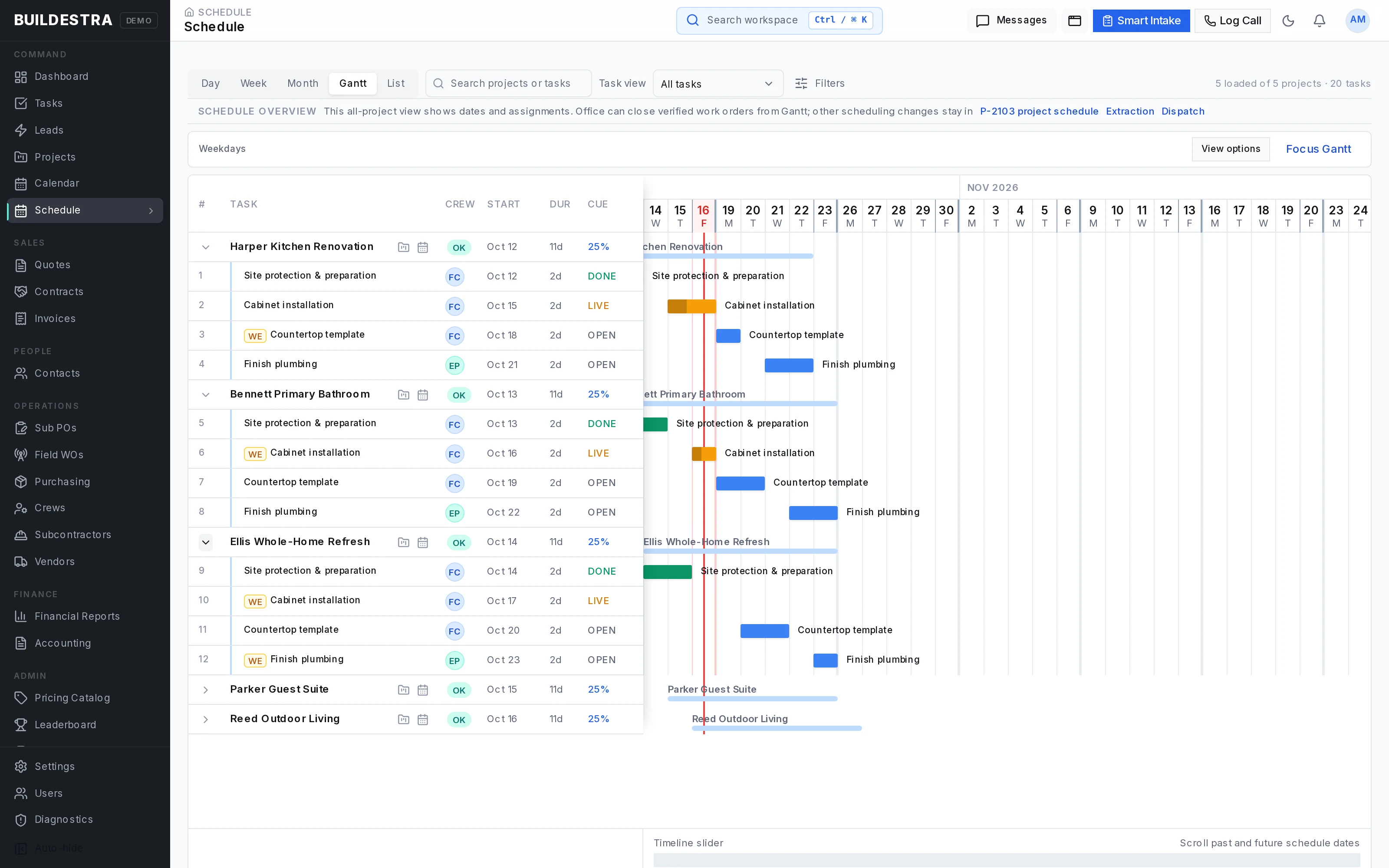
 A project timeline showing tasks, assignments, and planned work.
 Explore this view
 Product interface renders with fictional demonstration records. Explore all 19 views ↓
THE COMPLETE FEATURE GUIDE
Six areas of the business. Open any feature for the details. Integration and optional-module availability depend on your setup.
27 feature areas across the business.
From a new inquiry to a defined customer agreement.
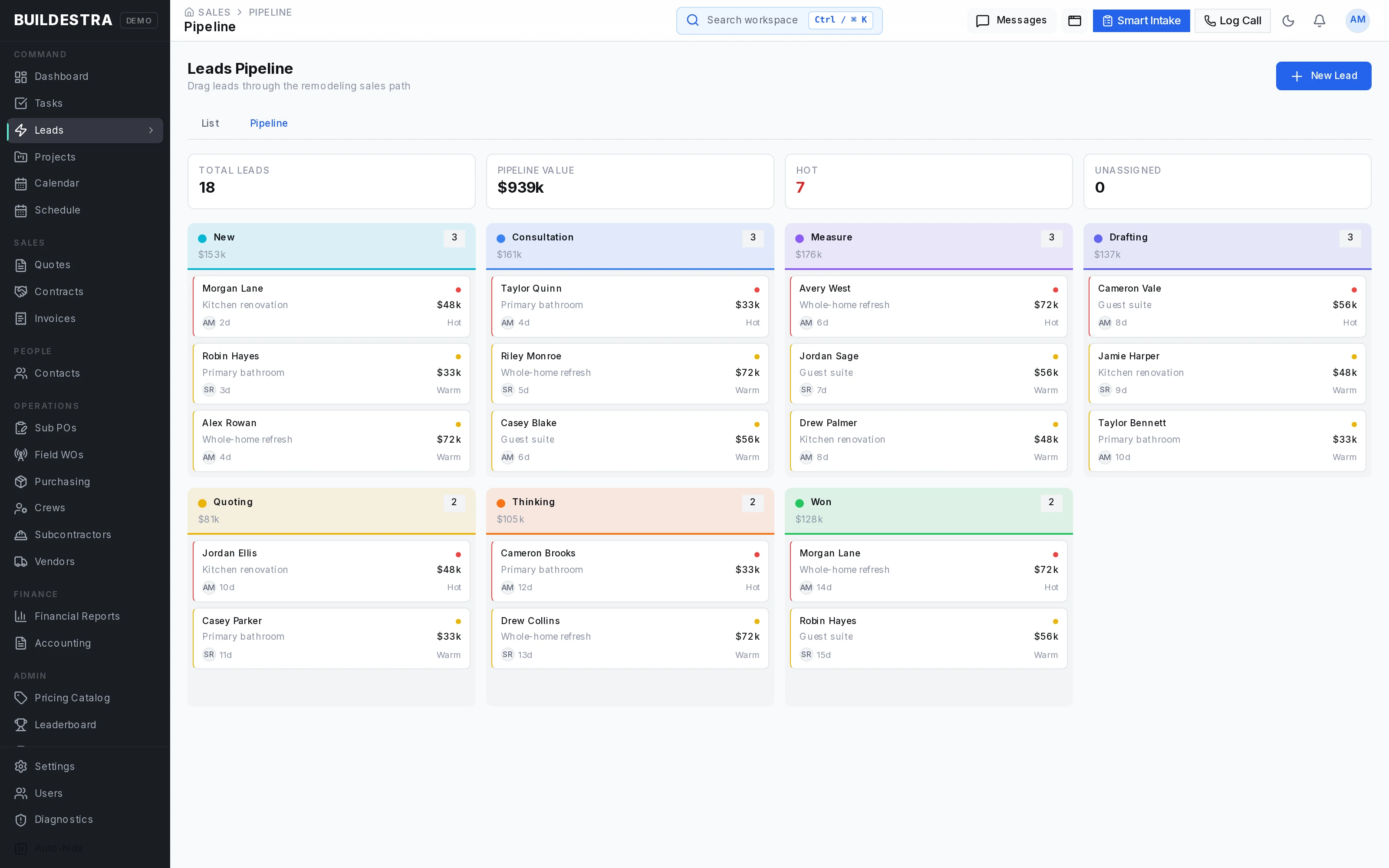
Organize incoming inquiries, track sales opportunities, assign responsibility, and manage the steps leading to a real project.
Buildestra includes lead lists and pipeline views, lead sources, salesperson assignments, consultation scheduling, qualification information, call notes, follow-up tasks, and won or lost outcomes. Customer, contact, and property records provide context around the opportunity.
Sales teams can see who needs attention, what has already been discussed, and what should happen next. Managers gain visibility into the pipeline and where opportunities are moving or getting stuck.
Keep follow-up organized with reusable email templates, message previews, outbound email history, and associated tasks.
Your team can prepare consistent communication while reviewing the message before sending it. Follow-up history can remain associated with the relevant lead, project, or quote version, helping another team member understand the conversation without starting over.
This supports a more consistent sales process and reduces reliance on individual inboxes and memory.
Manage the people, accounts, and physical locations behind your work.
Buildestra separates contacts, customers, and properties so your team can understand both the relationship and the jobsite. This is useful for repeat customers, customers with multiple properties, and projects involving several contacts.
Duplicate detection and contact management tools help maintain cleaner records as your business grows.
Turn detailed estimates into branded customer proposals with organized scope, descriptions, options, allowance context, and consistent document presentation.
Buildestra supports quote previews, customer-facing review pages, document design settings, printable or PDF output where supported, and showroom presentation tools.
Your team can communicate the work with greater clarity and give customers a more polished experience when reviewing a significant purchase.
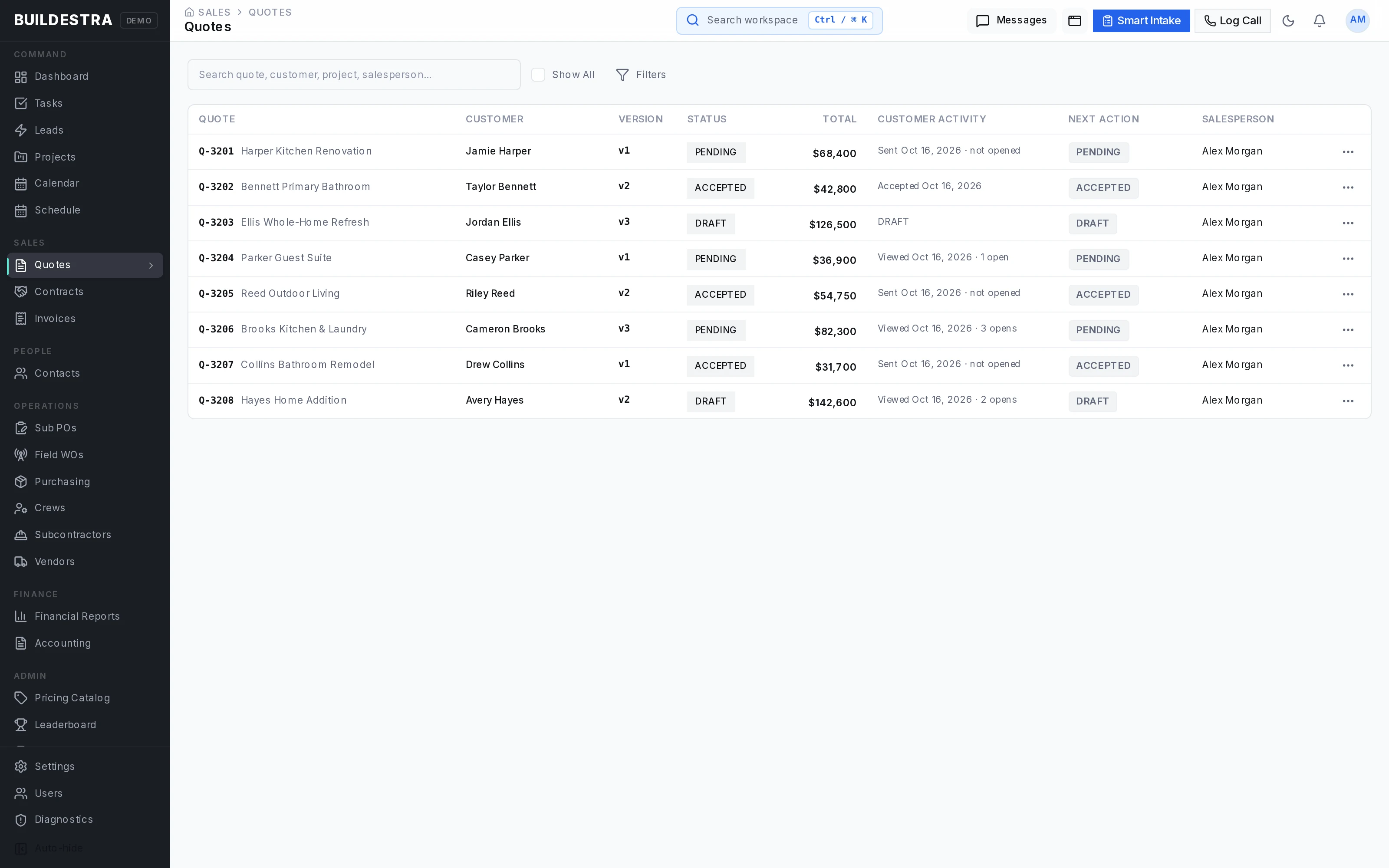
Each generated quote version captures a defined proposal for review and response.
That distinction matters when an estimator continues working, a customer requests changes, or a salesperson needs to reference an earlier proposal. Version history helps your team identify which scope and price were presented and which version was accepted or declined.
Buildestra supports digital delivery, response tracking, revised versions, and manual or showroom presentation workflows.
This creates a clearer record of the sales agreement as the opportunity moves toward a contract.
Create contracts from the accepted quote version so the contractual scope starts from the customer-approved proposal.
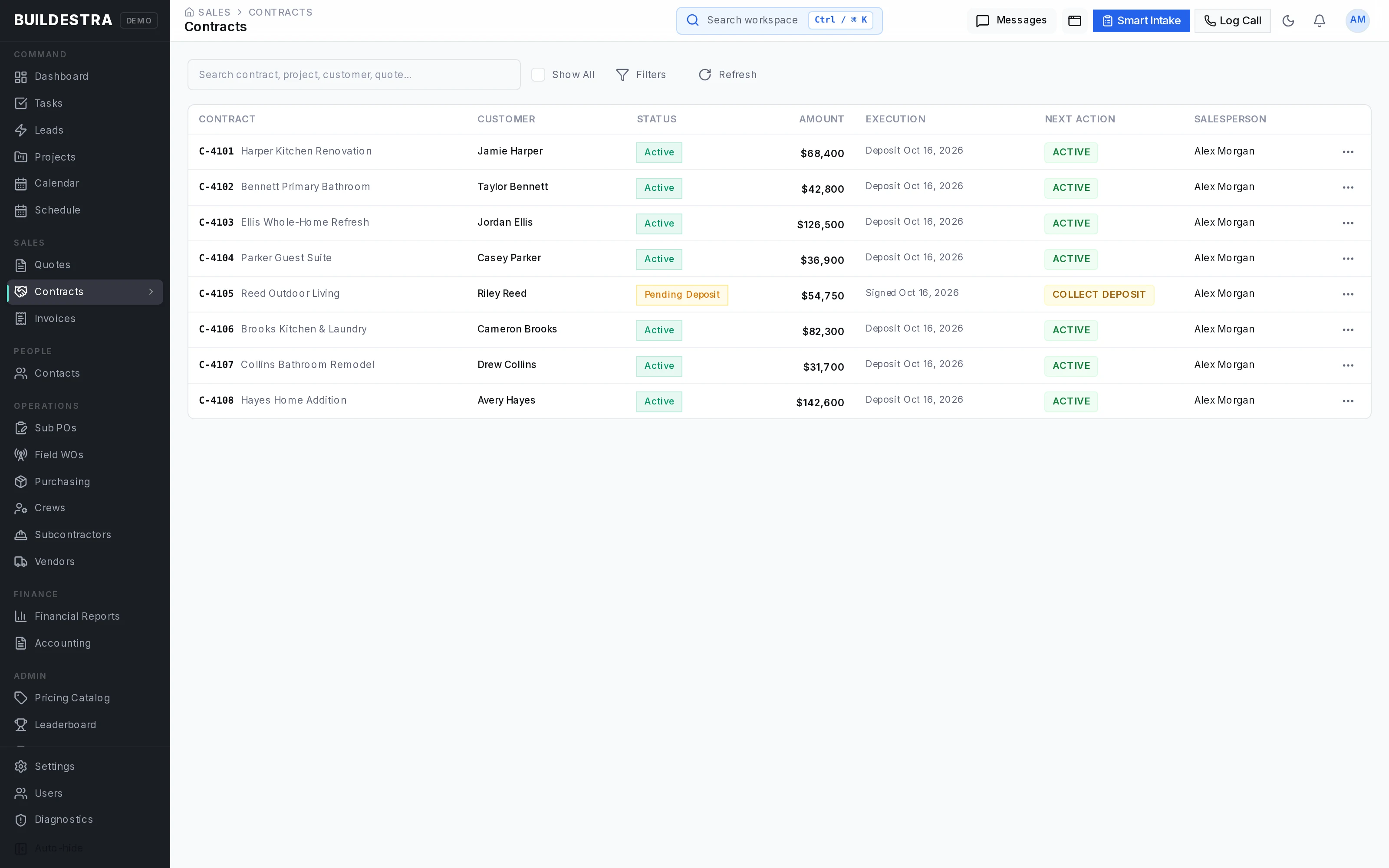
Buildestra includes contract versions, document presentation, digital signing, in-person signature recording, and contract status tracking. Reusable payment schedule templates help establish the planned deposit and progress payment structure.
This supports a clearer handoff from sales to operations, with a defined agreement and payment expectations.
Detailed estimates backed by reusable company knowledge.
Build estimates by room or work area, then organize the scope into service blocks, categories, and individual line items.
For a remodeling company, that can mean separating a kitchen, primary bathroom, guest bathroom, or other project area while maintaining detailed scope within each space.
Estimating capabilities include:
This gives estimators control over the details while helping customers receive a more understandable proposal.
Standardize common work with service block templates, scope item packages, saved blocks, and saved rooms.
A team can reuse a well-developed starting point for recurring work, then adjust quantities, products, scope, and pricing for the current job. Saved rooms support private and shared reuse, allowing individual estimating methods and company standards to coexist.
For businesses that repeatedly sell similar kitchens, bathrooms, installations, or trade packages, reusable estimating content helps reduce setup work and forgotten scope.
Maintain a reusable price book with catalog items, cost information, pricing history, and effective dates.
Vendor records support supplier information and pricing configuration, including multiplier and freight-related settings. Supported vendor import tools help bring product information into estimating and selection workflows.
Your team gains a more consistent starting point for pricing while retaining the ability to review the specific requirements of each project.
Keep supporting information close to the estimate.
Buildestra includes area and measurement records, photo support, room intake files, and extracted information that staff can review as a reference. A tile calculator supports tile-related estimating work.
Drafting workflows allow teams to create requests, assign drafting work, track deliverables, request revisions, and approve results. Cabinet list importing supports compatible 2020 Design CSV files.
These tools help connect field information and design preparation with the scope your team is pricing.
Keep approvals, customer choices, and the schedule connected.
Use launch preparation and readiness checks to review the information required to move a sold project into production.
The project workspace brings together contract status, deposit information, payment schedules, scheduling readiness, and operational requirements.
Teams can identify missing preparation before releasing work, helping reduce preventable problems caused by starting a job with incomplete information.
Manage the products, finishes, and choices that can affect both the customer experience and the project budget.
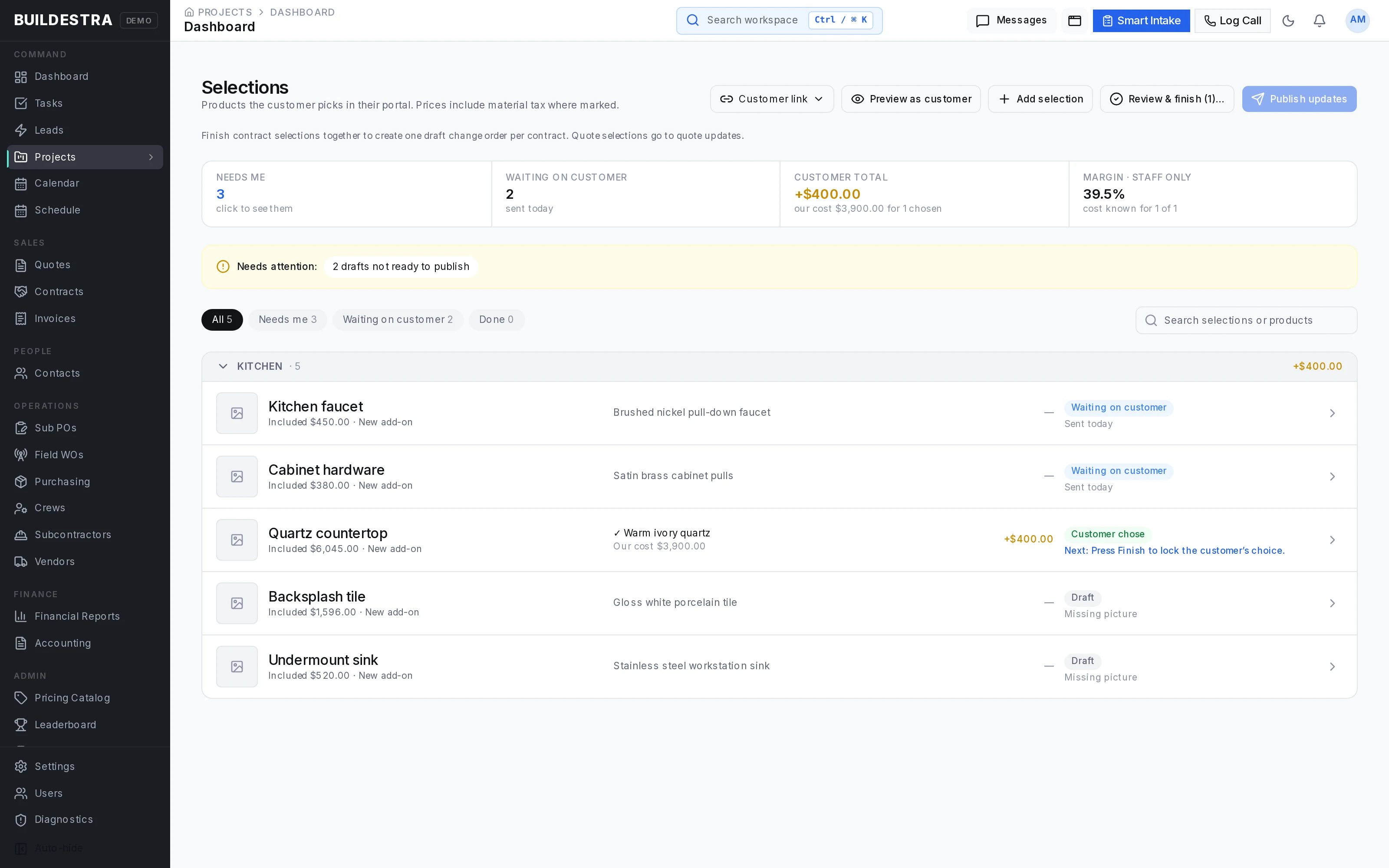
Buildestra supports selection items, product options, images, customer-facing publications, questions, approval history, and office-recorded approvals. Allowance workflows provide budget context and help track differences between the original allowance and the eventual choice.
Selection decisions can move through controlled contract, change order, and purchasing handoffs where applicable.
This gives salespeople, customers, coordinators, and buyers a clearer record of what has been selected and what remains unresolved.
Keep additional work, substitutions, credits, and scope adjustments organized through a defined approval process.
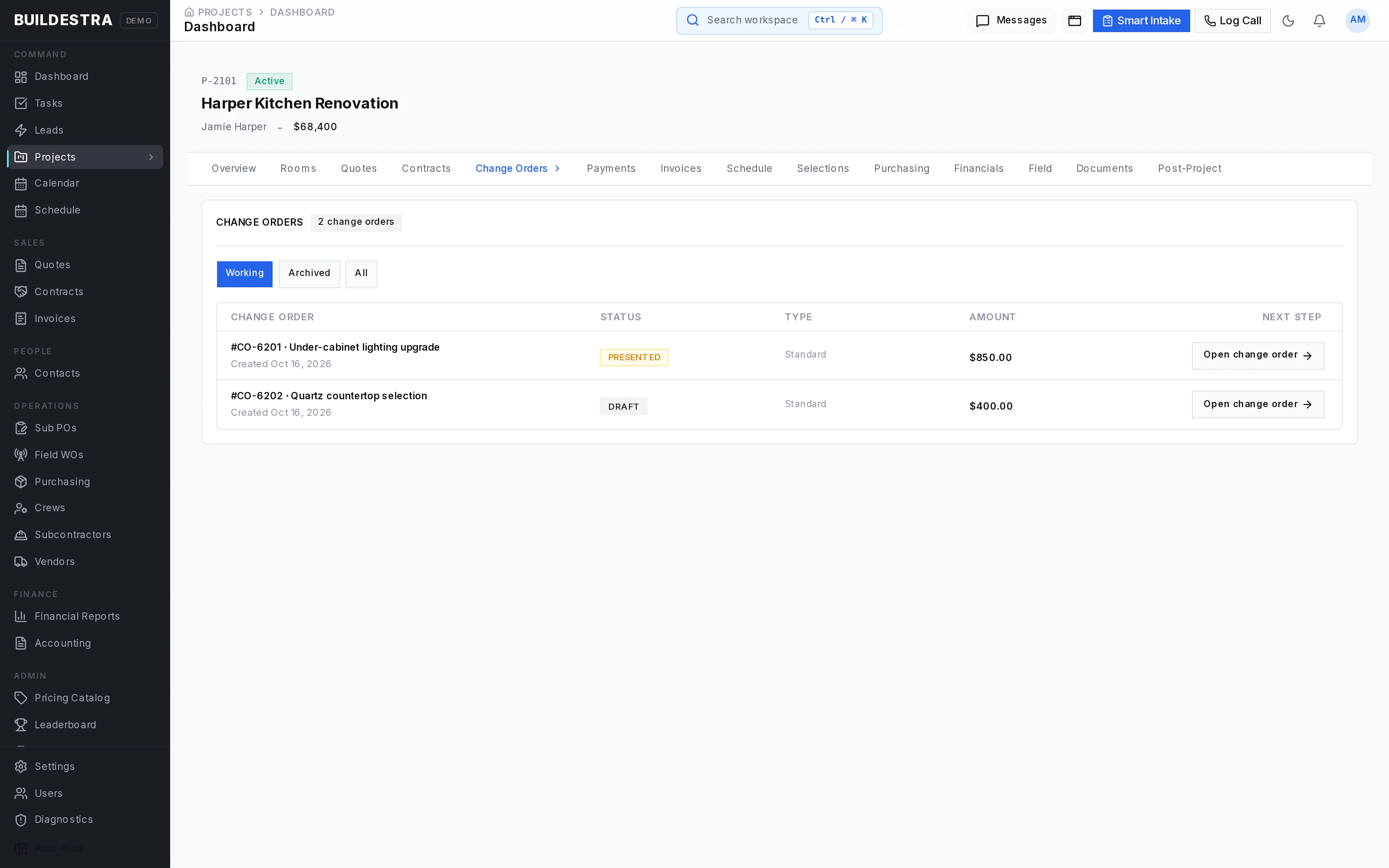
Buildestra includes versioned change orders, itemized changes, customer review, written approval tracking, and a record of resulting financial effects. Approved changes can feed relevant scheduling and procurement workflows.
Eligible approved change orders can also produce itemized customer invoices.
A documented change process helps teams address the effect of a decision before it becomes an undocumented expense or a billing disagreement.
Plan work with project schedules, a global schedule view, calendar views, and Gantt controls.
Scheduling capabilities include:
Microsoft 365 calendar integration supports configured calendar workflows.
Coordinators gain a clearer view of who is scheduled, what work is planned, and which assignments or dependencies need attention.
People, materials, field activity, and project records.
Package the job into work orders that identify scope, responsibility, schedule, and relevant supporting information.
Buildestra supports work order preparation, assignment, dispatch checks, acknowledgments, start-of-work tracking, completion, rework requests, and office approval.
Dedicated field lead and subcontractor views provide access to relevant assignments and shared information.
The platform also distinguishes customer contract pricing from subcontractor payable amounts, helping the office manage both sides of the job with the appropriate controls.
Manage subcontractor profiles, trades, licenses, insurance information, certifications, and supporting compliance records.
Subcontractor purchase order and agreement workflows support defined scope, document preparation, approval links, revisions, questions, and recorded office approvals.
Where enabled, bid and counteroffer tools support pricing conversations, while competing offers can be managed through controlled award workflows.
Your team gains a stronger record of what was offered, what the subcontractor accepted, and which revision governs the agreement.
Bring procurement needs into a purchasing workspace where buyers can review requirements, confirm quantities and costs, and record the purchasing process.
Buildestra supports material demand associated with frozen contract scope and approved change orders, along with review steps for selection-driven requirements.
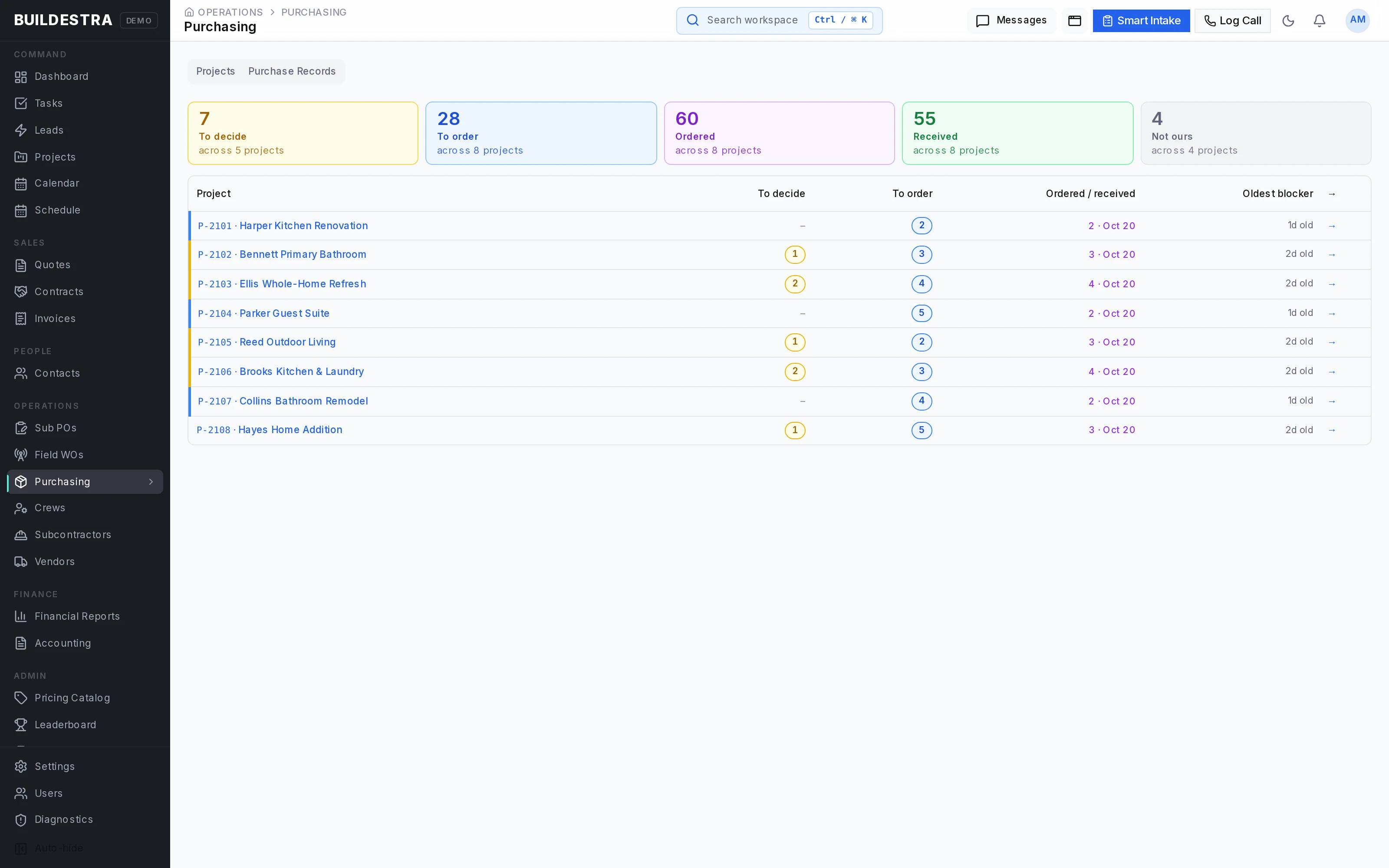
Purchasing capabilities cover purchase logs and order records, delivery expectations, backorders, receiving, staging, returns, and credits. Replacement review tools help buyers resolve eligible substitutions while retaining purchasing history.
This helps answer practical questions:
Capture daily logs, photos, crew activity, time entries, delays, and job progress.
Supervisors and office staff can review submitted information, approve eligible records, and follow up on incomplete or disputed work.
Punchlists support documented issues, before-and-after photos, resolution, and verification. These records help the team understand what happened on site and what still needs to be completed.
Keep project files, notes, messages, meetings, and technical questions connected to their context.
Buildestra includes internal staff messaging, customer project messaging, attachments, mentions, unread states, and notifications. Job notes support controlled visibility for internal, customer, and subcontractor audiences.
Meeting records and action items help document decisions and responsibilities. RFIs provide a structured way to ask, answer, and close project questions, with change order linkage where appropriate.
This helps reduce the time spent reconstructing decisions from separate conversations.
Track the administrative and quality requirements that accompany construction work.
Buildestra includes permit records and documents, inspection scheduling and results, safety incidents and corrective actions, company compliance records, and subcontractor insurance and certification tracking.
Formal notices and lien waiver records provide additional documentation tools for relevant projects.
These capabilities help teams organize requirements and evidence throughout the job.
Billing, job costs, business performance, and accounting handoffs.
Manage customer invoices, deposits, progress billing, recorded payments, adjustments, and outstanding balances.
Buildestra supports invoice preparation and sending, customer invoice portals, payment instructions, reminder controls, payment recording, split payments, deposited status, and controlled reversals or corrections.
Project payment workspaces bring together contract value, payment schedules, billing, and receipts. Customer payment applications and retainage workflows support jobs with more structured billing requirements.
Owners and office teams can see what has been billed, what has been received, and what still requires collection attention.
Review project financial performance through budget-versus-actual information, margin analysis, forecasts, and variance alerts.
Company-level reporting includes financial summaries, sales pipeline information, project health, team performance, operational indicators, cash flow forecasting, work-in-progress reporting, and overhead or break-even analysis.
Sales management tools include goals, leaderboards, achievements, commissions, statements, and supported adjustment workflows.
These views help management identify financial and operational issues earlier and understand performance across the business.
Buildestra includes configurable QuickBooks connection, mapping, and export workflows for supported accounting records.
Accounting tools cover account, project class, and tax mappings, export batches, synchronization logs, and supported customer, vendor, invoice, payment, bill, and journal entry workflows.
CSV and Excel import tools support data preparation, mapping, validation, and import history. Tenant data export tools provide additional access to business records.
Integration availability and supported export flows depend on setup.
Customer participation, closeout, permissions, and optional AI.
Give customers access to the information and actions relevant to their project through dedicated portal experiences.
Depending on the document, project stage, and enabled features, customers can:
A central customer experience helps reduce scattered attachments and makes it easier to direct the customer to the next required action.
Bring the project to completion with a structured review of operational, financial, and documentation requirements.
Buildestra’s closeout workflow evaluates completion gates, supports documented exceptions where permitted, and manages the transition into completed status and warranty.
Warranty tools organize terms, customer claims, coverage evaluation, service activity, and resolution. Post-project tools support review request records and referral tracking.
Your team can maintain a clearer record of its remaining obligations and the customer relationship after the main work is finished.
Give users access appropriate to their role and work.
Buildestra includes permission checks, tenant-scoped records, controlled customer and subcontractor views, audit history, notification preferences, and searchable business information.
Customer-facing documents and portals are designed to present customer information while keeping internal cost and margin details within authorized staff workflows.
Buildestra also contains a Room Agent designed to assist with room-estimating conversations, scope review, relevant historical information, and supported estimate operations.
Its capabilities include company knowledge and memory retrieval, historical pricing references, review findings, and preview or confirmation controls for supported changes. Administrative tools provide model configuration, usage tracking, and spending limits.
Access is currently restricted. This is best presented as an optional capability subject to availability, rather than a standard feature available to every user.
No matching features. Try a broader word or clear your search.
A PLATFORM FOR THE WHOLE TEAM
Owners need visibility. Estimators need scope control. Project managers and buyers need clear decisions. Field teams need defined assignments. Customers need an easier way to review and respond.
Views and actions depend on roles, project stage, and enabled features. These are areas of the same platform.
BRING THE CUSTOMER INTO THE LOOP
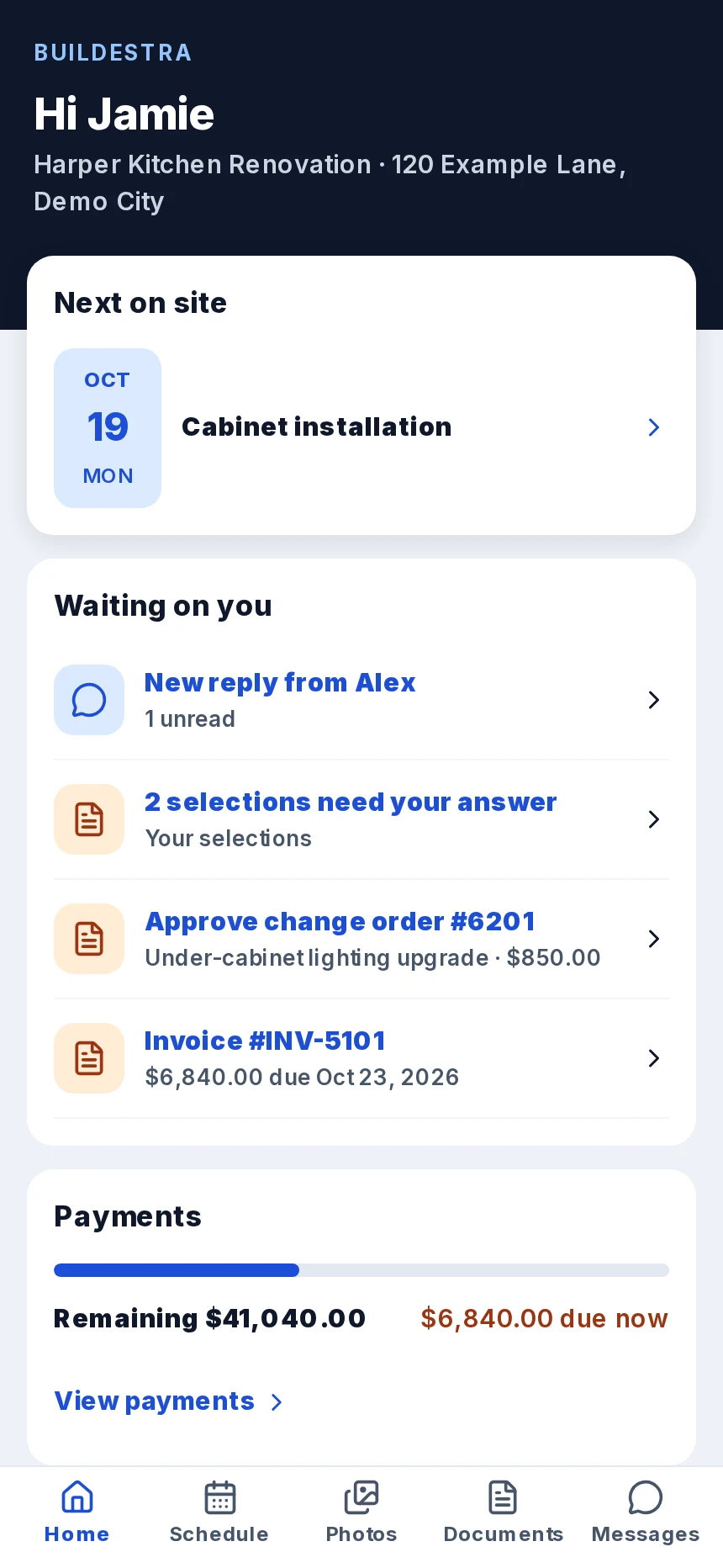
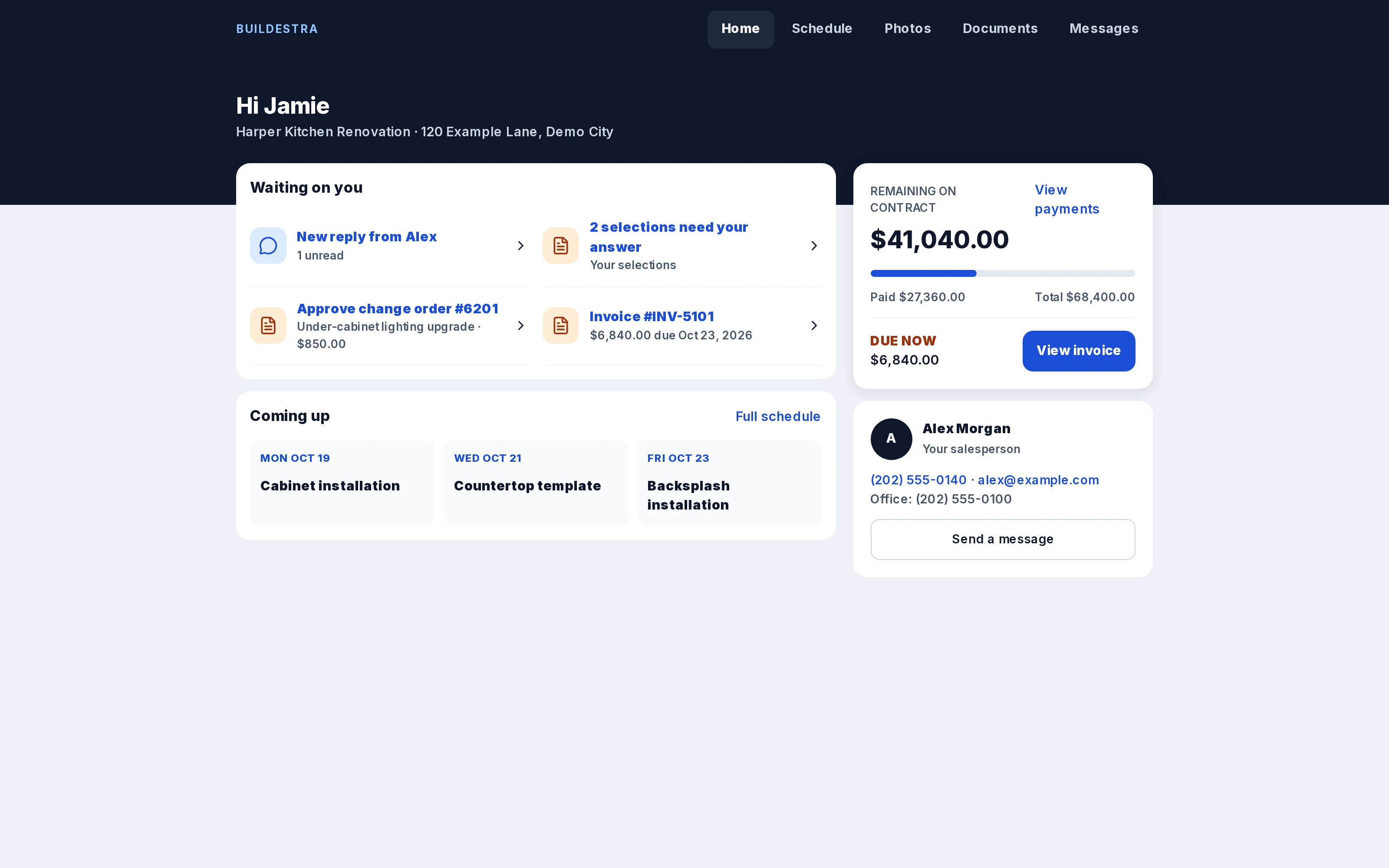
Give customers a clear place to see upcoming work, pending choices, messages, and payments—from their phone.
Explore the customer views ↗Customer views show relevant project information. Available actions depend on the project stage and enabled features.
 Explore this view
 READY FOR REAL WORK. OPENING CAREFULLY.
Buildestra is fully functional and has been used in production for six months. We’re refining the details while welcoming a handful of companies into alpha.
Access starts with a conversation. We’ll look at your workflow and arrange individual setup if there’s a fit.
LIMITED ALPHA ACCESS
No public self-service signup. Post-alpha pricing has not been announced.
A CLOSER LOOK AT BUILDESTRA
Explore 19 desktop, document, and mobile views. Open a screen to read the details and move through the gallery.
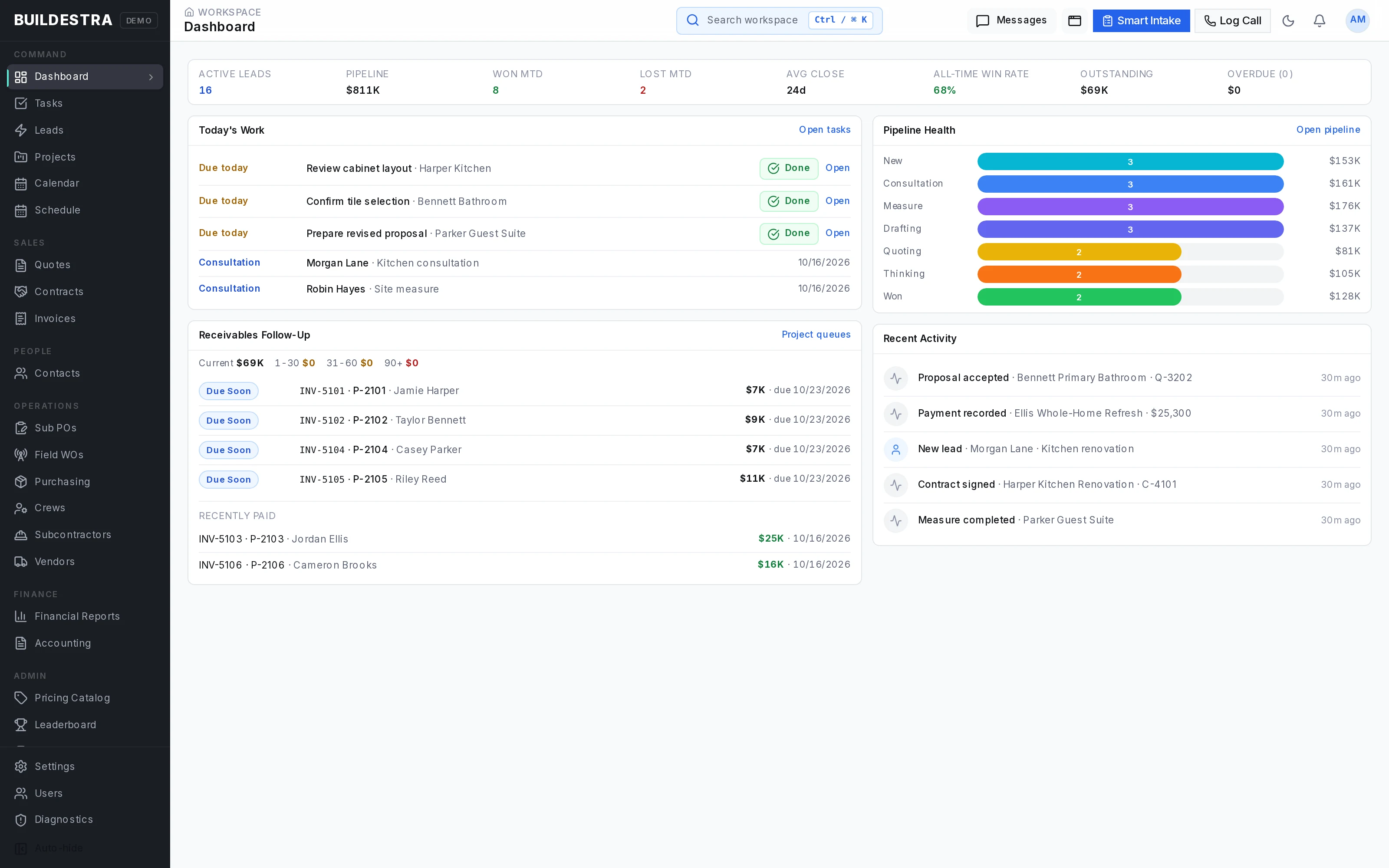
Explore this view See sales activity, tasks, consultations and invoice follow-up in one workspace.
 Explore this view
 Organize opportunities across the sales process.
 Explore this view
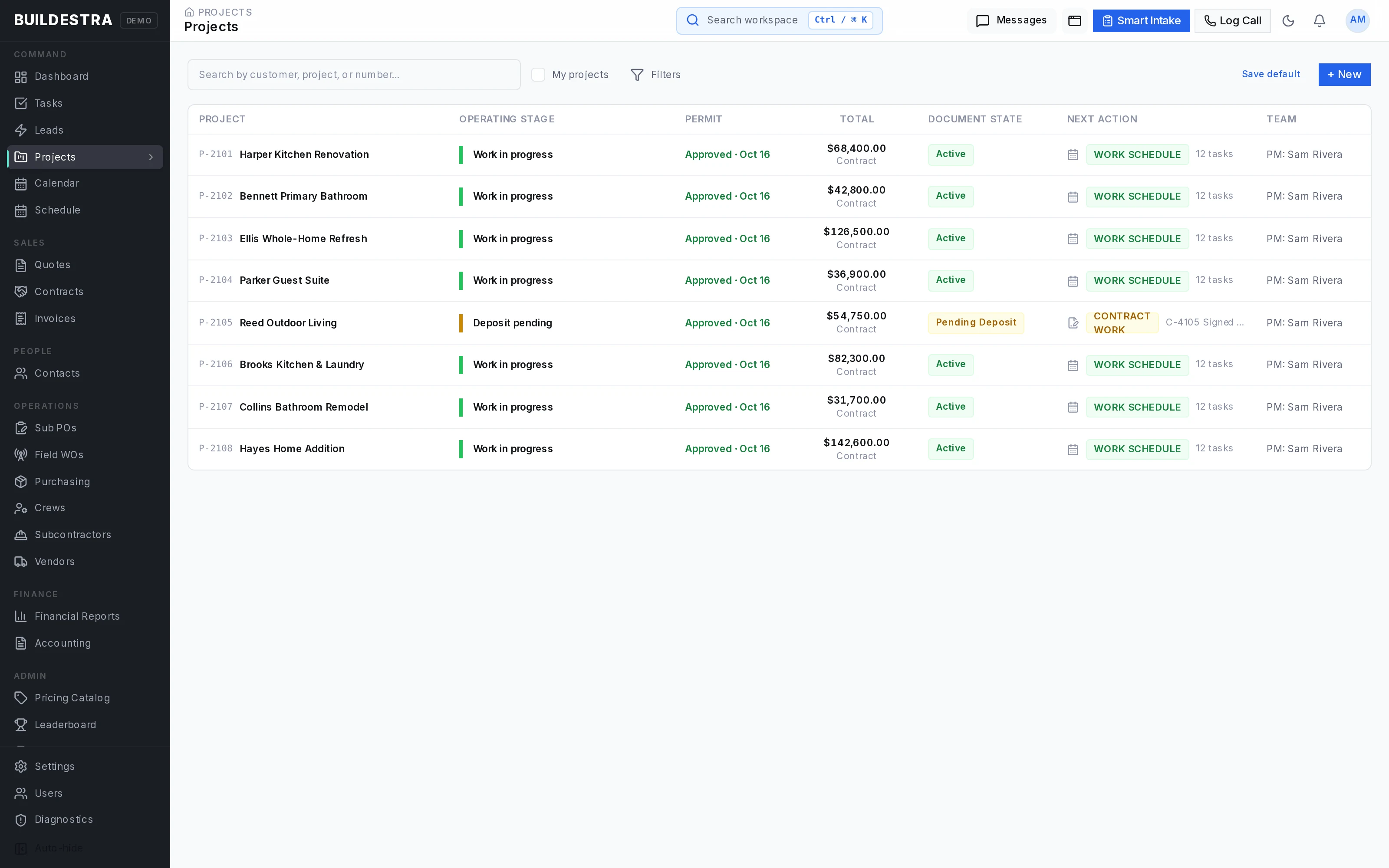
 Review projects, ownership and operating status.
Explore this view Build detailed room scopes and estimates alongside a proposal preview.
 Explore this view
 Present a branded, itemized remodeling proposal.
 Explore this view
 Track proposal versions, amounts and response status.
 Explore this view
 Manage contract records and signing progress.
 Explore this view
 Track changes to the agreed project scope.
 Explore this view
 Coordinate product decisions and customer approvals.
Explore this view Review projects, tasks and trade assignments on a Gantt timeline.
 Explore this view
 Monitor procurement decisions, orders and receiving across projects.
 Explore this view
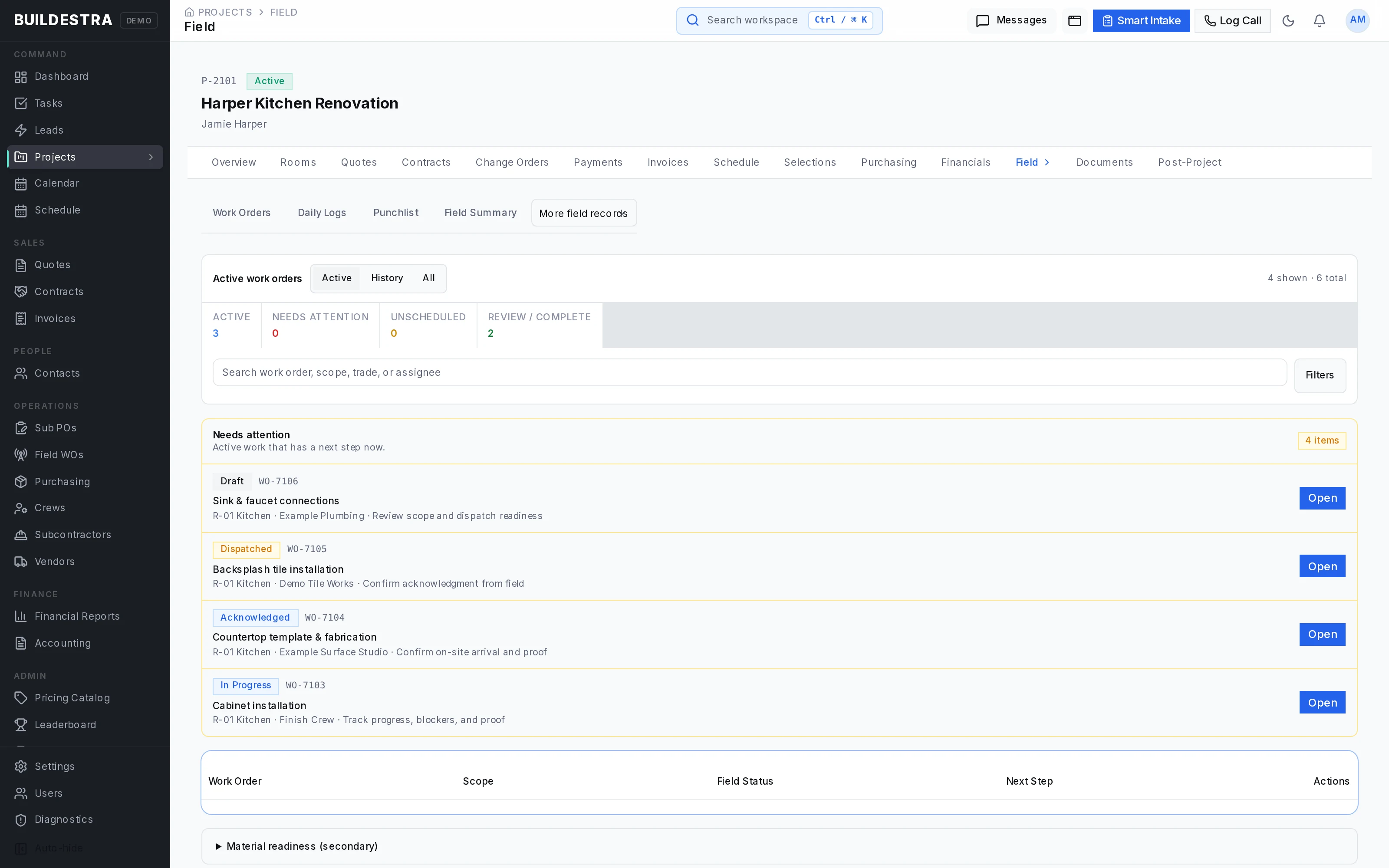
 Review assigned work and items requiring attention.
 Explore this view
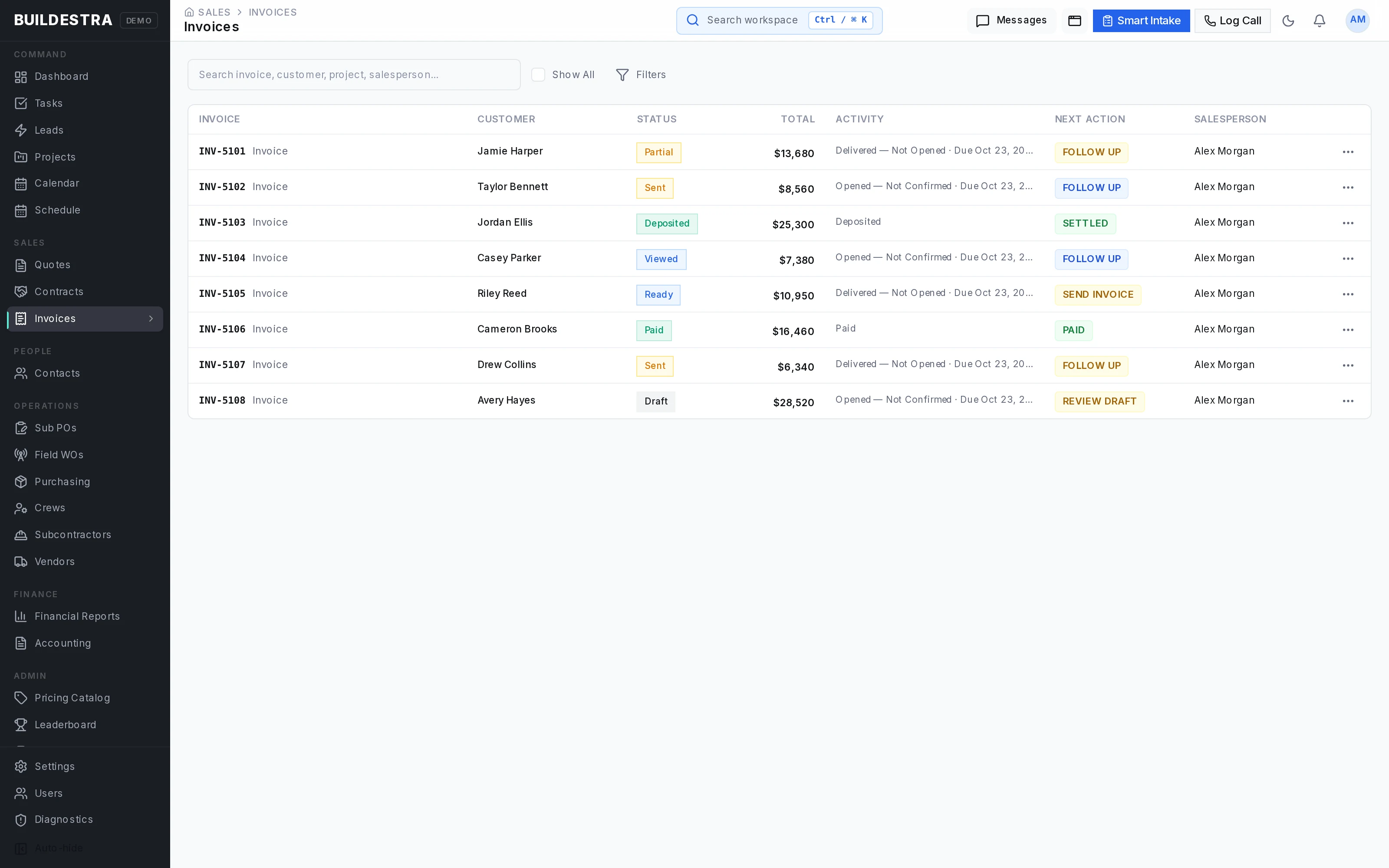
 Track invoices, balances and payment status.
 Explore this view
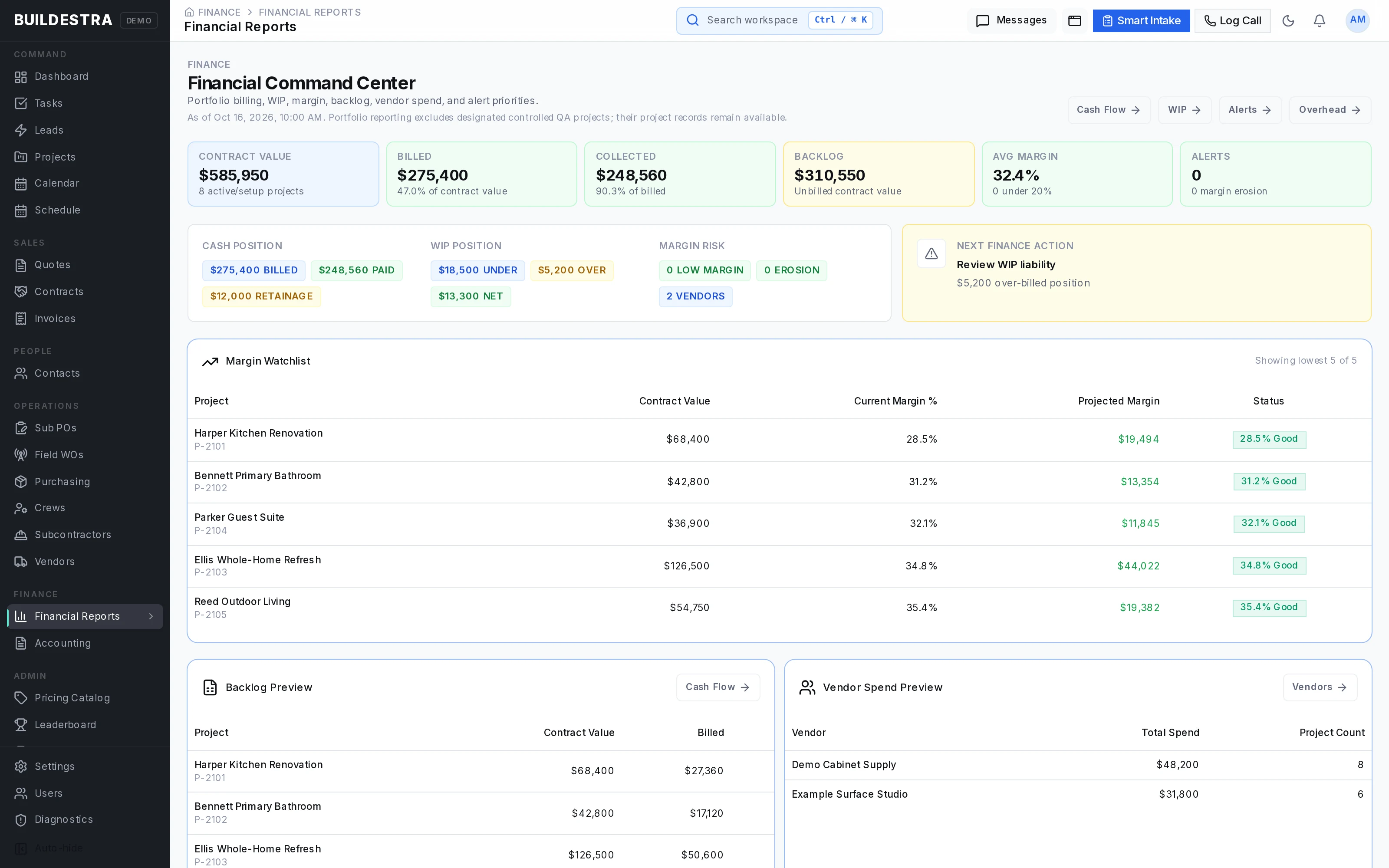
 Review project margins, backlog and vendor spending.
 Explore this view
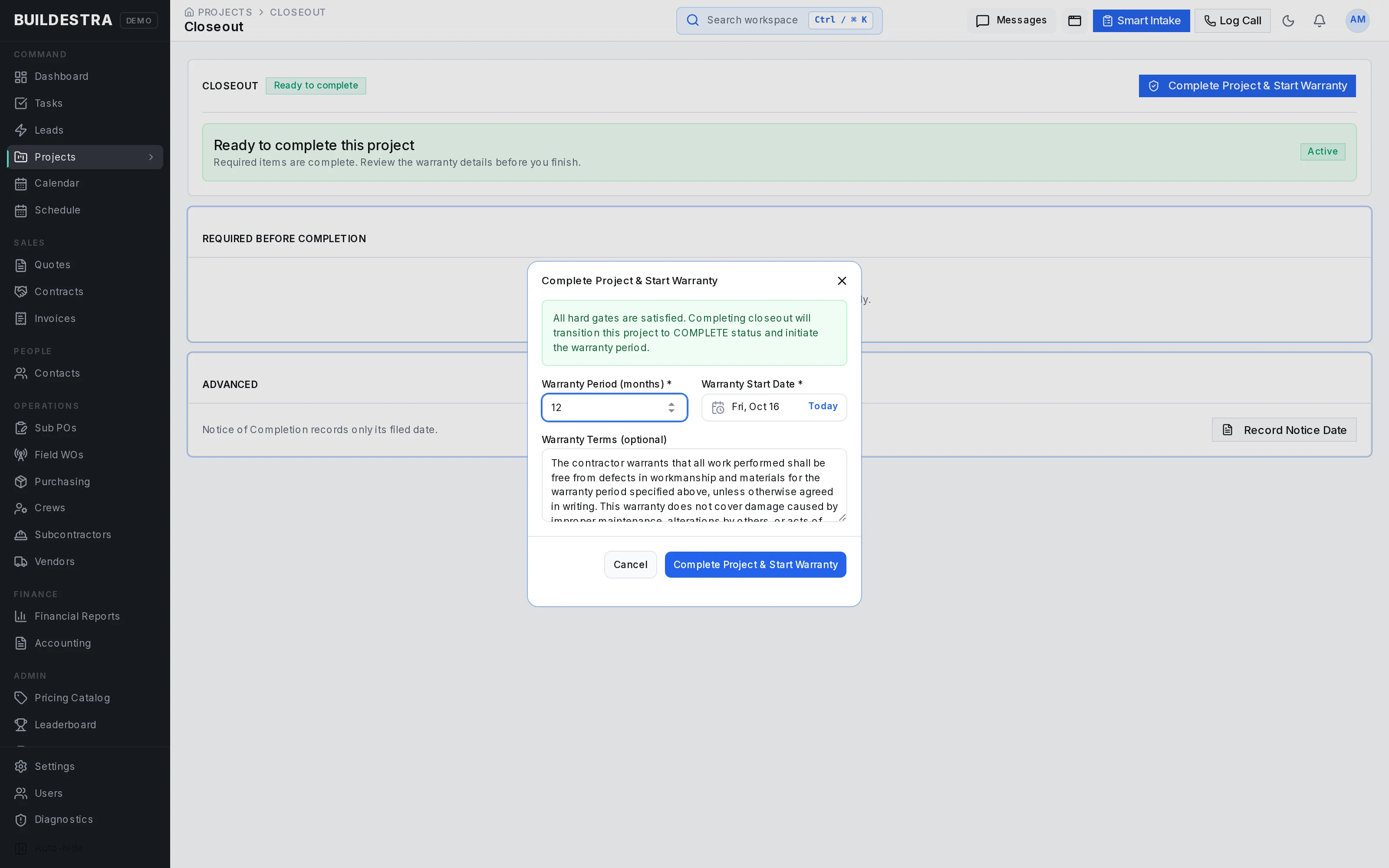
 Review completion readiness and set warranty details.
 Explore this view
 Give customers one place to see upcoming work, decisions and payments.
Explore this view Access project updates and pending decisions on a phone.
 Explore this view
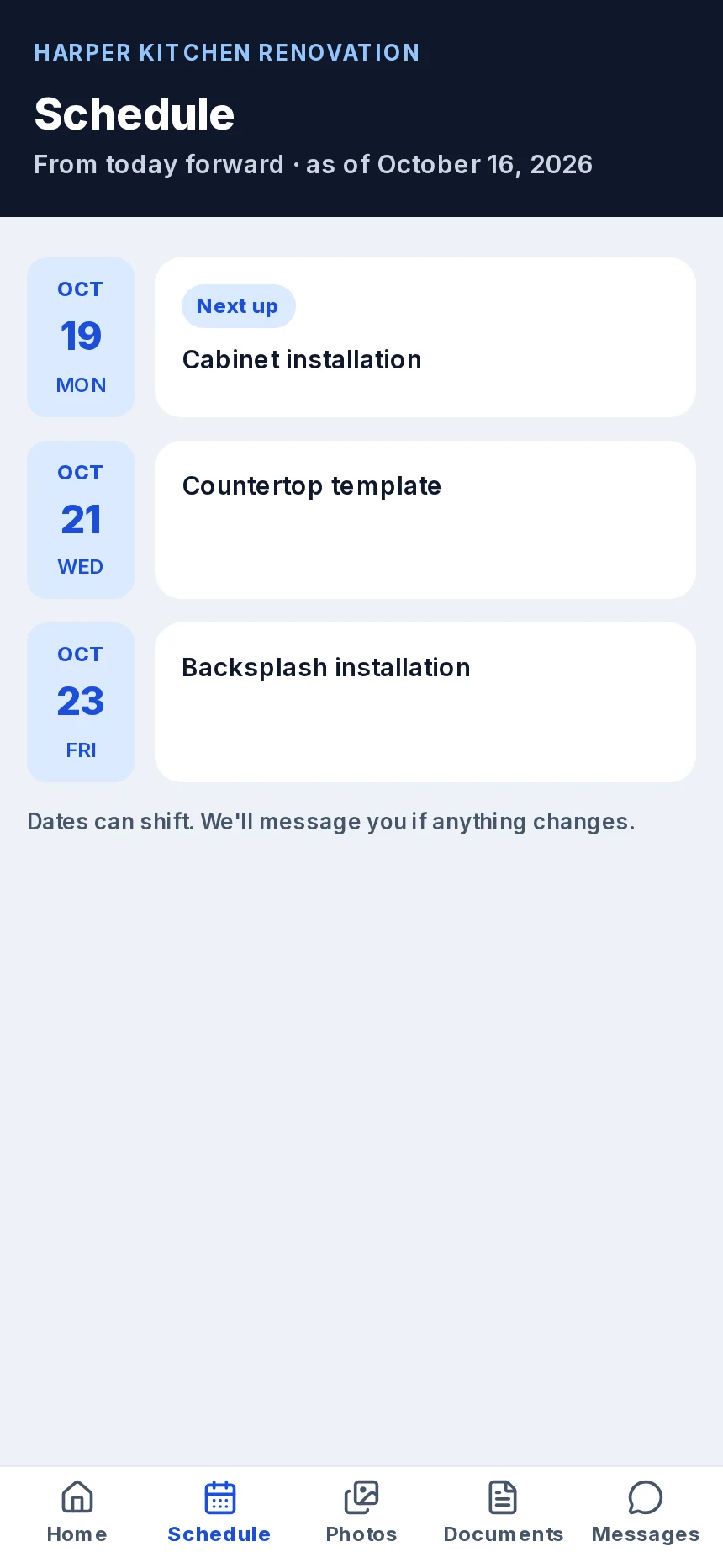
 View upcoming project appointments on a phone.
 Explore this view
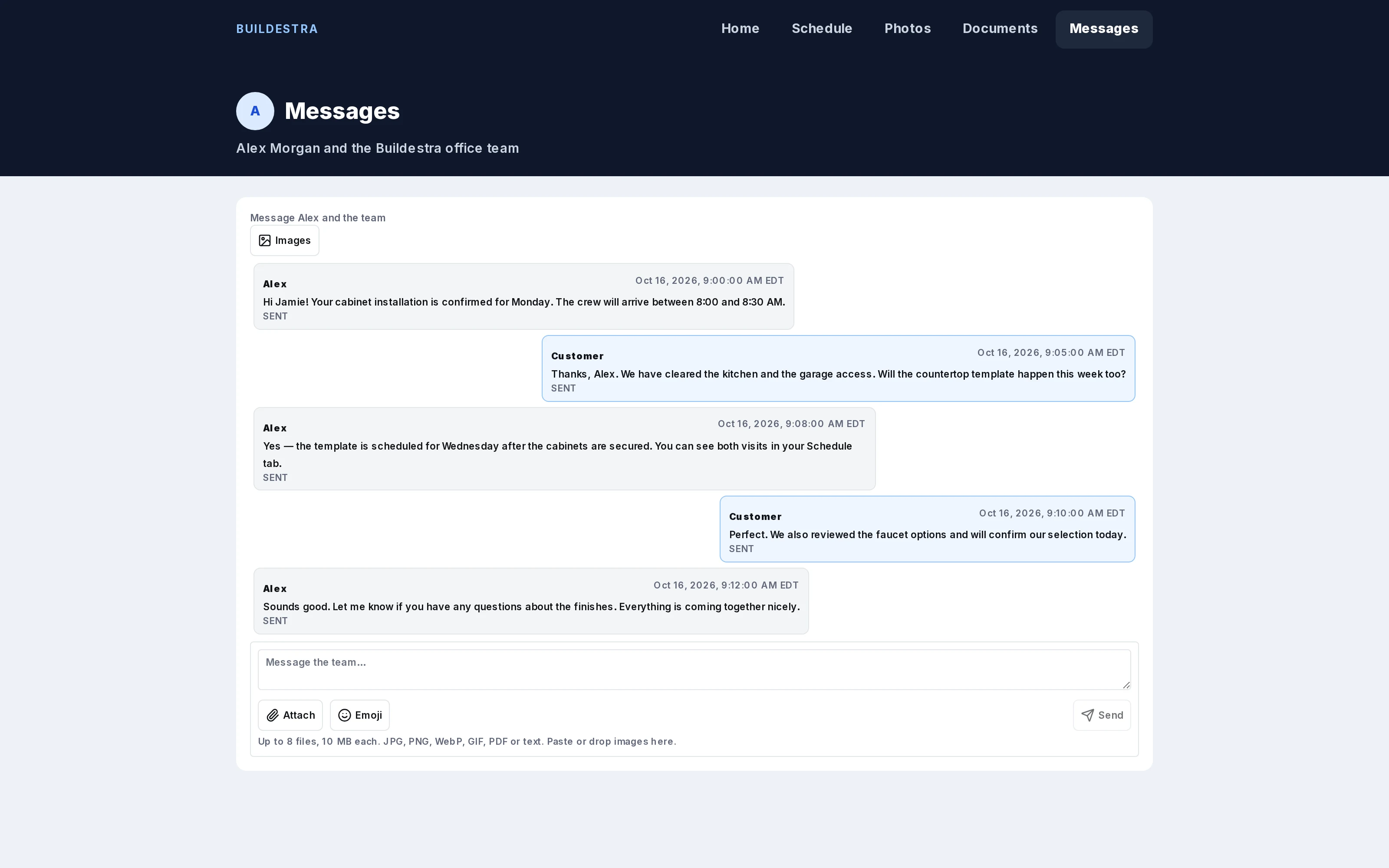
 Keep project conversations together in the customer portal.
Screens show the product interface with fictional demonstration data and Buildestra branding. Names and figures are illustrative. Integrations and optional features depend on configuration.
A FEW PRACTICAL QUESTIONS
Buildestra is a working platform that has been used in production for six months. Alpha describes this limited rollout and the ongoing refinement of the experience. We’ll discuss your company’s needs, relevant workflows, and setup individually.
PriceDesk focuses on quoting construction work from confirmed prices and controlled sharing between subs and GCs. Buildestra covers the wider contracting business: sales, detailed project estimates, agreements, scheduling, purchasing, field work, financial tracking, and warranty.
No. QuickBooks and Microsoft 365 workflows require configuration and support specific flows. The optional Room Agent estimating assistant is under restricted access. We’ll explain what is available for your setup before onboarding.
We’re selecting a handful of companies for individual alpha setup. Contact us to discuss your business and arrange a demonstration. Sending an inquiry does not create an account or guarantee a place.
Selected companies can use Buildestra at no charge until it leaves alpha. Post-alpha pricing has not been announced.
Explore the screenshots above, then contact us to arrange a demonstration of the working app and discuss the workflows your company needs.
LET’S SEE HOW YOUR BUSINESS WORKS
Tell us what you build, how your team works, and what you want to bring together. We’ll follow up about a demonstration and alpha access.
Prefer email? [email protected]
We use the details you submit to respond to your inquiry. The contact form sends email through Resend; it does not create an app account or subscribe you to marketing.